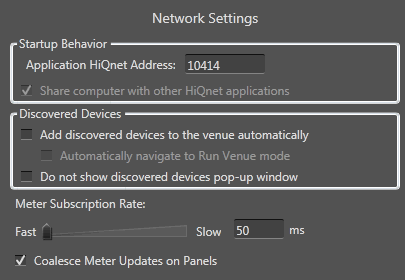
Application HiQnet Address: the HiQnet address of this occurrence of Audio Architect. This is the address that other Audio Architect applications will see on the Advanced Network Configuration screen.
Share this computer with other HiQnet applications: Whether to allow other HiQnet applications to access this computer.
 Add discovered devices to the venue automatically: When checked, devices that are discovered on the network are added to the venue.
NOTE: BSS devices are not added automatically, and devices will only be added if the venue has one room.
Automatically navigate to Run Venue: When checked, directly after discovered devices are added to the venue Audio Architect will enter Run Venue mode.
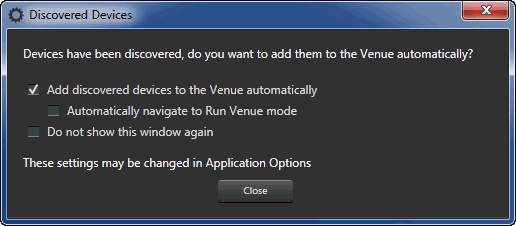
Do not show discovered devices pop-up window: If this box is left unchecked, when devices are discovered on the network the following window is presented:
Sometimes critical packets are dropped over the Ethernet, especially wireless Ethernet, which can cause devices to drop offline. To prevent this loss, the user can slow down the meter subscriptions. The faster the meter subscription rate, the more real-time data is displayed.
Coalesce Meter Updates on Panels: This is a global setting that effects all of the control panels in your venue file.
When this setting is enabled, meter updates are grouped together and redrawn to improve performance. In rare situations you may get some performance improvement with this setting disabled.